
Personalized Marketing
A Personal URL for Every Recipient
A personalized URL, or PURL, is a web address that belongs to one person.
Instead of sending every person to the same landing page, every recipient gets
their own personalized page. When they arrive, you don’t just know that
someone responded. You know who, which list they came from, which
mail kit they received, and what they did next.
That single difference is what turns direct mail from a cost to value your client can measure.
How a PURL Campaign Works
1. The URLs are generated with the list.
Every record in the mail file gets its own address, built automatically when the campaign is set up. The same step creates the matching QR code.
2. They go on the piece.
The personalized URL and its QR code are placed in the artwork like any other variable field, so they print in one pass.
3. The recipient lands on a page that knows them.
Their page greets them by name and can show the offer, imagery and options that match their segment, not a generic landing page. Known form fields are pre-populated.
4. The response lands in the dashboard as it happens.
A visit, a form, a click, a call: logged in real time and tied to the exact mail piece that triggered it.
Take it a step further. See how a scan can start an AI voice conversation →
Every Action, Attributed
The point of giving each recipient their own address is what it lets you prove afterwards:
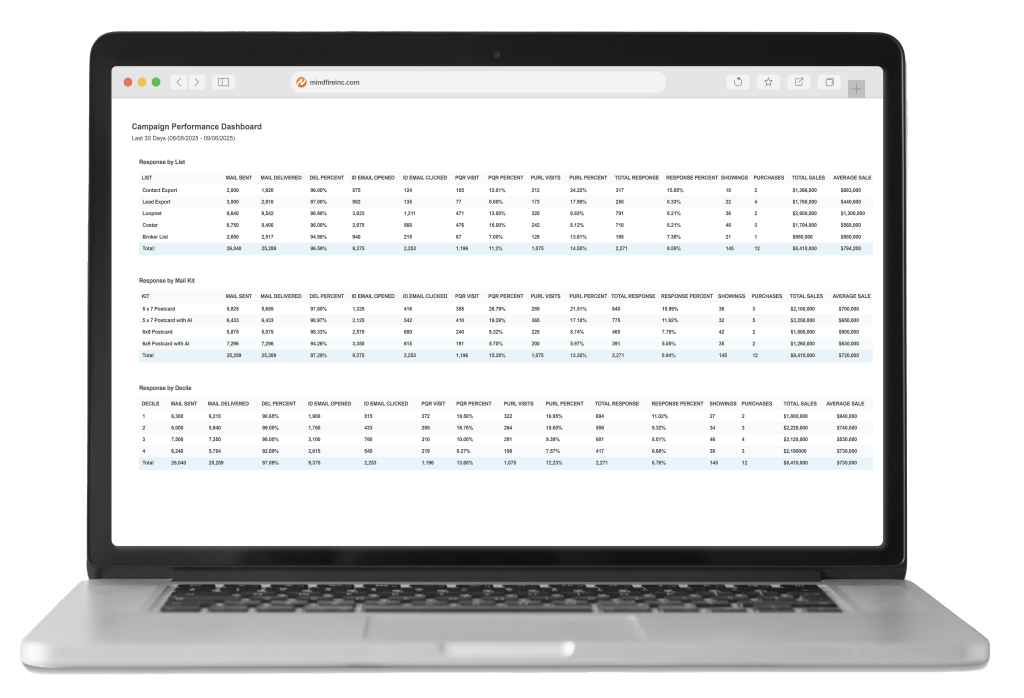
Response rate by channel
How many people came by PURL, by phone, by decile and which performs best for this audience.
Cost per response
By campaign, by segment, by channel.
Conversion tracking
The responses that became sales, appointments or sign-ups, not just traffic.
Side-by-side campaigns
Compare data for valuable decision-making.
This is the same attribution engine
behind every MindFire OmniChannel campaign, which has now recorded more than 640
million marketing events.
More than 15,000 companies run campaigns on the platform.
More than 15,000 companies run campaigns on the platform.
What to Look For in a Platform
Does it generate at list scale, automatically?
Hand-built URLs stop being practical somewhere around the first few thousand records.
Does it host the landing pages, or just redirect?
A redirect tells you someone arrived. A hosted personalized page tells you what they did.
Does the response data reach a real attribution model?
Visit counts are not proof. Revenue tied to a mail kit is.
Does it carry your brand?
Yes, the PURL carries your brand and the landing page can be tailored to your campaign design. Everything is white-labeled, including reporting.
Will it stand up to a client’s security review?
MindFire is SOC 2 Type II certified, which is usually the first question in financial services, healthcare and insurance.
Does it connect to the rest of the campaign?
PURLs, QR codes, follow-up email and retargeting running as one program rather than four tools.
Common Questions About PURLs
- What does PURL stand for?
- Personalized URL. It’s a unique web address created for one recipient, so that their response can be identified rather than counted anonymously.
- What should a PURL look like?
- Short enough to print and read. Most are built from the recipient’s name or customer ID, on a domain your client already recognizes rather than one of ours.
- Do PURLs still work if everyone scans the QR code instead?
- Yes, the QR code resolves to the personalized URL. The PURL is what makes the visit identifiable; the QR code is just the most popular way of reaching it.
- How many can you generate?
- Enough for any list you can mail. There is no stated ceiling, and the URLs are generated with the list rather than one at a time.
- Can PURLs be used with something other than direct mail?
- Yes, the same personalized addresses work in email and follow-up touches, so a recipient who ignores the mail piece and clicks the reminder is still the same tracked person.
- Do I need a separate PURL tool?
- Not with MindFire, where PURLs, QR codes, personalized landing pages, follow-up and attribution are one platform, set up as part of the campaign rather than bolted on beside it.
See It Running in a Real Campaign
Book a walkthrough and we’ll show you PURLs, QR codes and attribution
working on a live campaign, and what the reporting looks like with your logo on it.